Research Consortium Federated Cohort Query
Answer a consortium question across every partner site's data in place, with participant fields masked and small counts suppressed.
These images are illustrations of the concept, not screenshots of the actual product.
Overview
In science and research, the most useful questions often span several institutions. A consortium studying indoor air, for example, may enroll homes through different universities and institutes, each holding its own participant records under its own approvals. This concept illustrates a single query run in SemanticFed that answers one consortium question across every partner site, with the design keeping participant-level rows at the site that collected them.
Pooling that data the usual way means each site exporting records to a shared location, followed by agreements, de-identification and checks that nothing re-identifying slipped through. Even an aggregate table carries risk, because a cell that counts only a handful of homes can point to a specific household. The design treats both concerns as part of the run itself rather than as a manual step afterward.
The illustrated run detail sits in the Query Console, with a breadcrumb naming the sample consortium and a succeeded badge on the run. The question asks for homes with overnight nitrogen dioxide above a guideline level, grouped by cooking type, and resolves against a versioned consortium exposure model. Summary cards count the sites queried, participant rows exported, which reads zero in the sample, cells suppressed and columns masked. A Per-site execution panel shows each partner's Postgres database, the count by stratum pushed down to it and the number of homes it covered. The Pooled result table then lists each cooking type by site with a pooled total. Where a site's count falls below the threshold the cell reads as suppressed, and in those rows the pooled total is withheld as well, so the design keeps a hidden count from being worked back out of the totals.
A Governance panel lists the four columns masked by policy, namely home address, participant name, date of birth and zip code, and a minimum cell size of ten set as policy. Suppression is designed as a rule in SemanticFed's row and column policy model rather than a manual review. The panel also names the data use agreement behind the run and the CosmicIntersection grant it came through, with the grant's scopes and expiry, along with the researcher who requested the run and a count of approved policies that are active. The design intent is that CosmicIntersection holds the grant and SemanticFed enforces it at query time, so a data steward can see who asked, under which agreement and until when access runs. Save to CosmicIntersection and View audit log actions sit at the foot of the panel, the first designed to hand the pooled result back to CosmicIntersection.
What this concept shows
- Summary cards for sites queried, participant rows exported, cells suppressed and columns masked
- A per-site execution panel showing the count pushed down to each partner database and the homes it covered
- A pooled result table comparing each site's counts with a pooled total
- Small counts shown as suppressed below a minimum cell size, with the pooled total withheld for affected rows
- Home address, participant name, date of birth and zip code listed as masked by policy
- The data use agreement and the CosmicIntersection grant, with its scopes and expiry, shown beside the result
- The requesting researcher and the number of approved policies active for the run
- Save to CosmicIntersection and View audit log actions at the foot of the governance panel
How it works
- Choose a consortium question from the shared semantic model in the Query Console and run it.
- Let the engine push the count down to each partner site's own database, so participant rows stay where they were collected.
- Check the summary cards to confirm no participant rows were exported and how many cells and columns were protected.
- Read the pooled result by site, noting the cells suppressed below the minimum cell size.
- Review the governance panel for masked columns, the data use agreement, the grant's expiry and the requester.
- Save the result to CosmicIntersection or open the audit log for the run.
Who it's for
- Consortium data analysts
- Research data stewards
- Principal investigators
- Institutional data governance officers
Illustrations
1 illustration of this concept. Select one to view it full size.
Federated Cohort Query Run With Suppression and Grant Context
A desktop layout with the Query Console selected and a breadcrumb leading from a sample consortium to a single run marked succeeded, described as homes with overnight nitrogen dioxide above guideline by cooking type. Four cards count sites queried, participant rows exported at zero, cells suppressed and columns masked. The Per-site execution panel shows three partner institutions, each on a Postgres database, with a count by stratum pushed down and the number of homes queried. The Pooled result table lists gas cooking with and without a range hood, electric and induction by site and pooled; small counts appear as suppressed chips and two pooled totals are withheld. A Governance panel lists the masked columns, a minimum cell size policy, the data use agreement, a highlighted CosmicIntersection grant with its scopes and expiry, the requester and the approved policies, above Save to CosmicIntersection and View audit log buttons.
Topics
- federated cohort query
- multi-site research data analysis
- research consortium data sharing
- small cell suppression
- minimum cell size rule
- data use agreement enforcement
- participant data masking
- privacy preserving research query
- federated analysis without moving data
- pooled results across research sites
Related concepts
Federated Query Execution Plans
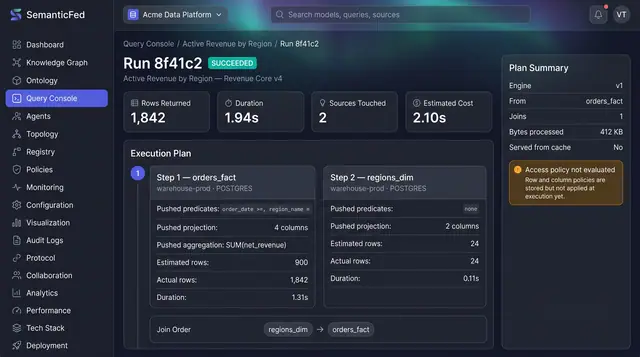
Open any query run and see exactly what was pushed down to each source, what each step really returned, and how the results were joined.
1 illustration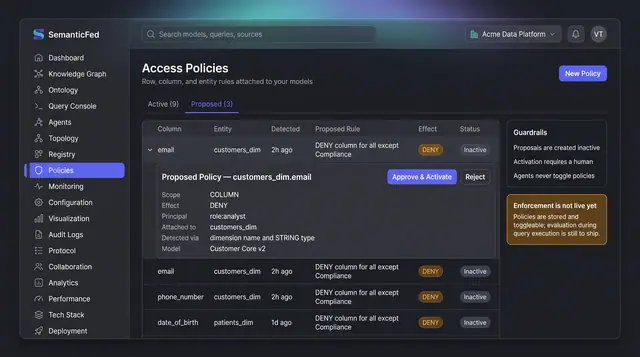
PII Access Policy Proposals
Sensitive columns are surfaced as inactive policy proposals with their detection reasoning, and only a person can approve and activate them.
1 illustration
Part of an industry solution
This concept appears in a cross-product solution on burdenoff.com — see how it works alongside other Burdenoff products to solve a problem in that industry.